This article shows how to using NHibernate with SQL server 2008 express and c# 2008 express edition. I will make a simple calculation service in WCF, save and retrieve the calculation history in MS SQL database using NHibernate. At last, I will make a winform client to call the service.
2. Download and install SQL server management studio express at
http://www.microsoft.com/download/en/details.aspx?displaylang=en&id=7593
Remember to install 3 prerequisites - .Net framework 3.5 SP1, Windows Installer 4.5, Windows PowerShell 1.0 before installing SQL server management studio express. Links to these programs can be found on SQL server management studio express download page.
3. Before we go more detail into implementation of the WCF services, we need to create database and setup proper user privileges in MS SQL server.
4. start sql server configuration manager and make sure SQL server(SQL Express) is running

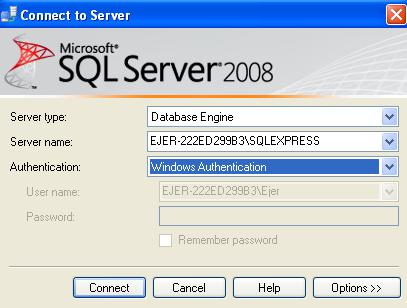
Start sql server management studio and login with default windows authentication


Check ‘db_owner’ and ‘public’ checkboxes.


5. Now database configuration is ready, let’s start to make some code. I created a solution ‘CalculationService’ in Visual studio c# 2008 express.
6. I then created a project ‘CalculationServiceHost’ which as the name indicates is a service host project, it also contains the integration code and configuration to MS SQL Database using NHibernate.
7. I defined 2 service contracts ICalculate and IHistory,
[ServiceContract(Namespace = "http://Xish.Project.CalcultionService")]
public interface ICalculate
{
[OperationContract]
double operate(double o1, double o2, string op);
}
[ServiceContract(Namespace = "http://Xish.Project.CalcultionService")]
public interface IHistory
{
[OperationContract]
List<OperationUnit> getCalculationHistory();
}
8. Download NHibernate from http://nhforge.orgImport following dll into project
LinFu.DynamicProxy.dll, NHibernate.ByteCode.LinFu.dll, NHibernate.Mapping.Attributes.dll, NHibernate.dll

9. Then I created a hibernate schema xml file which defines the data mapping structure of the calculation unit.
<hibernate-mapping xmlns="urn:nhibernate-mapping-2.2"
namespace="CalculationService.Host" assembly="ServiceHost">
<class name="OperationUnit" table="OperationUnit">
<id name="ID" column="Id">
<generator class="increment"/>
</id>
<property name="OPERAND1" column="Operand1"/>
<property name="OPERAND2" column="Operand2"/>
<property name="OPERATOR" column="Operator"/>
<property name="RESULT" column="Result"/>
</class>
</hibernate-mapping>
10. Following code shows how to use NHibernate to save a calculation unit record,
ISession session = NHibernateHelper.GetCurrentSession();
ITransaction tx = session.BeginTransaction();
session.Save(opunit);
tx.Commit();
NHibernateHelper.CloseSession();
11. Following code shows how to use NHibernate to retrieve calculation history,
ISession session = NHibernateHelper.GetCurrentSession();
ITransaction tx = session.BeginTransaction();
IQuery query = session.CreateQuery("from OperationUnit where Id>0");
List<OperationUnit> templist = query.List<OperationUnit>() as List<OperationUnit>;
tx.Commit();
NHibernateHelper.CloseSession();
12. Next step is to add NHibernate configurations in app.config file. If it is the first time you run the application, uncomment hbm2dll.auto property. Once NHibernate transaction is called, it will automatically generate new tables in the database based on definitions found in hhibernate schema files. Next time, you may want to comment it out if you don’t want to override existing tables.
<configSections>
<section
name="log4net"
type="log4net.Config.Log4NetConfigurationSectionHandler,log4net"
/>
<section name="hibernate-configuration"
type="NHibernate.Cfg.ConfigurationSectionHandler, NHibernate" />
</configSections>
<!-- Add this element -->
<hibernate-configuration xmlns="urn:nhibernate-configuration-2.2">
<session-factory>
<property name="dialect">NHibernate.Dialect.MsSql2008Dialect</property>
<property name="connection.provider">NHibernate.Connection.DriverConnectionProvider</property>
<property name="connection.connection_string">Server=localhost\SQLEXPRESS;initial catalog=calculationservice;User Id=calculationuser;Password=calculationpassword;Integrated Security=True;MultipleActiveResultSets=True</property>
<property name="proxyfactory.factory_class">NHibernate.ByteCode.LinFu.ProxyFactoryFactory, NHibernate.ByteCode.LinFu</property>
<!--property name="hbm2ddl.auto">create</property-->
<mapping assembly="ServiceHost" />
</session-factory>
</hibernate-configuration>
13. Follwing code create a service host and make it running and waiting for service request.
Uri baseAddress = new Uri("http://localhost:8000/XishService");
// Step 2 of the hosting procedure: Create ServiceHost
ServiceHost selfHost = new ServiceHost(typeof(CalculationService), baseAddress);
try
{
// Step 3 of the hosting procedure: Add service endpoints.
selfHost.AddServiceEndpoint(
typeof(ICalculate),
new WSHttpBinding(),
"Calculation");
selfHost.AddServiceEndpoint(
typeof(IHistory),
new WSHttpBinding(),
"History");
// Step 4 of the hosting procedure: Enable metadata exchange.
ServiceMetadataBehavior smb = new ServiceMetadataBehavior();
smb.HttpGetEnabled = true;
selfHost.Description.Behaviors.Add(smb);
// Step 5 of the hosting procedure: Start (and then stop) the service.
selfHost.Open();
Console.WriteLine("The service is ready.");
Console.WriteLine("Press <ENTER> to terminate service.");
Console.WriteLine();
Console.ReadLine();
// Close the ServiceHostBase to shutdown the service.
selfHost.Close();
}
catch (CommunicationException ce)
{
Console.WriteLine("An exception occurred: {0}", ce.Message);
selfHost.Abort();
}
14. We are done with the host part, now I am going to create a winform client ‘CalculationServiceClient’ which should consume the services.
15. I need to create a proxy class from the webservices. To do so, I run following command in visual studio 2008 command prompt.
svcutil http://localhost:8000/XishService /language:C# /out:Proxy.cs /noConfig
It will generate a proxy class with which I can call the calculation services in the client.
16. Add service endpoints in app.config
15. I need to create a proxy class from the webservices. To do so, I run following command in visual studio 2008 command prompt.
svcutil http://localhost:8000/XishService /language:C# /out:Proxy.cs /noConfig
It will generate a proxy class with which I can call the calculation services in the client.
16. Add service endpoints in app.config
<configuration>
<system.serviceModel>
<client>
<endpoint address="http://localhost:8000/XishService/Calculation"
binding="wsHttpBinding"
contract="ICalculate" name="WSHttpBinding_ICalculate">
</endpoint>
<endpoint address="http://localhost:8000/XishService/History"
binding="wsHttpBinding"
contract="IHistory" name="WSHttpBinding_IHistory">
</endpoint>
</client>
</system.serviceModel>
</configuration>
17. Using the webservice client classes defined in proxy class to call services as shown below.
CalculateClient proxy = new CalculateClient("WSHttpBinding_ICalculate");
double result = proxy.operate(Convert.ToDouble(operand1Tbx.Text), Convert.ToDouble(operand2Tbx.Text), operatorTbx.Text);
HistoryClient proxy = new HistoryClient("WSHttpBinding_IHistory");
CalculationService.Host.OperationUnit[] operationunits = proxy.getCalculationHistory();
historyTbx.Clear();
18. We are done. When I press calculate button, the client will call the calculation service to return a result and save the operation in database. When I press history button, the client will call the getHistory service to return calculation history and display in the text box in client.

4


